Introduction to Dual Monitor Setups and the Importance of Monitor Arms
Given today,s fast-paced digital environment, the importance of dual monitor setups have become increasingly popular among professionals and enthusiasts alike. A dual monitor configuration can significantly enhance productivity by allowing users to multitask efficiently. By having two screens, an individual can easily switch between applications, manage multiple documents, or keep reference materials open while working. This leads to a streamlined workflow and reduces the time spent toggling between windows, ultimately improving overall efficiency.
Monitor arms from my experience and a wide array of people are of the opinion that dual monitor usage in a home office with proper space enhance dual monitor setups by providing flexibility and ergonomic benefits. These adjustable arms allow users to position their monitors at optimal height and angling, reducing neck and back strain often associated with prolonged screen time. By elevating the monitors, users can maintain a more natural posture while they work, which is crucial in preventing potential health issues related to improper workstation setups.
With the versatility of monitor arms, from my experience, users can customize their workspace based on individual preferences and needs. Whether for gaming, graphic design, programming, or standard business tasks, having monitors properly mounted can free up valuable desk space, creating a cleaner and more organized environment. This not only fosters a sense of clarity but can also inspire creativity and focus. Furthermore, many monitor arms offer features such as cable management, which keeps unsightly wires hidden and contributes to a neat appearance.
In various use cases, dual monitors can dramatically affect user experience, and has increased my productivity. Gamers benefit from immersive play, graphic designers can manipulate images across screens without interruptions, while programmers can display their code and relevant documentation side by side. As such, selecting the right monitor arm becomes crucial in maximizing the advantages of a dual monitor setup, ensuring an optimized and ergonomic workspace.
When selecting a monitor arm for a dual monitor setup, several key factors are essential to consider to ensure that the choice is both functional and conducive to a comfortable working environment. One significant factor is the weight capacity of the monitor arm. It is crucial to choose a monitor arm that can support the combined weight of both monitors. Most manufacturers provide a weight limit, which should be adhered to in order to prevent any safety hazards or potential damage to the equipment.
Another important aspect to evaluate is adjustability. A monitor arm that offers a wide range of motion allows users to customize their viewing angles to reduce eye strain and enhance comfort. Look for arms with features such as height adjustment, tilt, and swivel capabilities, as these will enable a more ergonomic setup that can be adapted to individual preferences.
Mounting options are also critical when choosing a monitor arm. Ensure that the arm can be easily mounted to your desk or wall and check for compatibility with VESA (Video Electronics Standards Association) mounting patterns, which are standard across most monitor brands. This ensures a seamless installation process.
Compatibility with different monitor sizes is another factor to consider. Some monitor arms are specifically designed for certain monitor dimensions and may not support larger or smaller displays adequately. Make sure to choose an arm that can accommodate the dimensions and weight of your specific monitors.
Additionally, ease of installation should not be overlooked. A straightforward installation process can save time and reduce frustration. Lastly, consider the build quality of the monitor arm. A sturdy and durable construction ensures longevity and reliable performance over time.
By taking these factors into account, users can select a monitor arm tailored to their dual setup needs, enhancing both productivity and ergonomics.
Top 5 Monitor Arms for Dual Setups: Reviews and Recommendations
When considering the best monitor arms for dual setups, there are several key factors to evaluate, including design, functionality, and user ratings. Below, we present five top-rated monitor arms that cater to a variety of user needs.
1. VIVO Dual Monitor Desk Mount
The VIVO Dual Monitor Mount is known for its sturdy construction and impressive range of motion. It supports screens up to 27 inches and offers adjustable height, tilt, and rotation. The clamp and grommet mounting options make it convenient for various desk setups. However, some users noted that assembly can be slightly challenging. User Rating: 4.7/5.

- Fits 13″ to 30″ Screens – Dual monitor mount fitting two screens 13” to 30” in size and up to 22 lbs in weight each with…
- Articulation & Height Adjustment – Adjustable arm offers +90° to -90° tilt, 180° swivel, 360° rotation, and height adjus…
- Heavy Duty C-Clamp – Mounts to the back of your desk (up to 3.25” thick) via a heavy-duty C-clamp or optional grommet mo…
2. AmazonBasics Dual Monitor Stand
This monitor arm provides an affordable solution for users seeking simplicity and practicality. It supports monitors up to 24 inches and offers a fixed height with a tiltable feature. While it may lack the adjustability of more expensive models, users appreciate its straightforward setup and stability. User Rating: 4.5/5.
3. Ergotron LX Dual Stacking Arm
For those who prioritize aesthetics and adjustability, the Ergotron LX is an excellent choice. It allows for a full range of motion and features a sleek modern design. Recommended for gamers and professionals, it can support heavier monitors, which adds to its versatility. User Rating: 4.8/5.


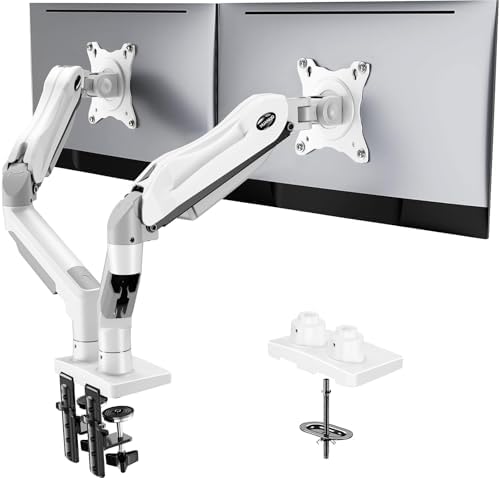
4. HUANUO Dual Monitor Mount
The HUANUO Dual Monitor Mount caters well to users needing flexibility. It supports up to 27-inch monitors and allows for extensive height adjustments. Users have praised its stability and ease of installation, though some have mentioned it can be bulkier than expected. User Rating: 4.6/5.
5. Mount-It! Dual Monitor Mount
This robust dual monitor mount offers both full motion and a sleek design. Suitable for monitors up to 32 inches, it allows extensive adjustment options for optimal ergonomics. Some users find it a bit heavy, potentially complicating mounting. User Rating: 4.4/5.
Each of these monitor arms presents unique features tailored to particular user preferences, ensuring you can find one that complements your dual monitor setup effectively.
Installation Tips and Best Practices for Dual Monitor Arm Setup
Setting up dual monitor arms can significantly enhance your workspace efficiency and ergonomics. Begin by thoroughly reviewing the manufacturer’s instructions that come with your monitor arms. Each model may have specific requirements, so it’s crucial to follow their guidelines for installation.
Start with the basic installation process by securing each arm to your desk or wall, depending on the model. Ensure that the mounting brackets are tightly fastened to prevent any wobbling once the monitors are attached. It is advisable to use a stud finder if you are mounting on a wall. Confirm that your desk can support the weight of the monitors you intend to use.
Next, adjust the height and angle of your monitors for optimal viewing. Ideally, the top of the screen should be at or slightly below eye level, and you should have a slight downward gaze when viewing the center of the screen. The distance between your eyes and the screen should be approximately an arm’s length to reduce eye strain.
An essential part of the installation is cable management. Many monitor arms come with cable management solutions to keep your workspace tidy. Utilize cable ties or clips to secure any excess cable length to prevent tripping hazards and to maintain a clean appearance. This not only enhances aesthetics but also prolongs the lifespan of your cables.
Common mistakes to avoid include overlooking the weight capacity of the monitor arms, which can lead to potential failure if exceeded. Additionally, failing to adjust the monitors properly can lead to discomfort or strain. Regular reevaluation of your setup is advisable as your preferences may change over time.
Long-term benefits of using monitor arms extend beyond improved ergonomics; they promote workspace flexibility and can reduce clutter. By allowing you to customize your monitor positioning, they contribute to a healthier work environment that fosters productivity and reduces the risk of musculoskeletal disorders.